Complete beginner
Never planned an endurance race?
Plain-English onboarding and guided setup help you build a race configuration without knowing the terminology up front.
Compare fuel, tyre, driver-rotation and pit-stop strategies before your endurance race.
A local-first, terminal-based strategy tool for sim racers, team captains, and race-day operators. Free and open-source. Optional local AI routes plain language; deterministic tools own the race facts.
MIT licensed · Python 3.11–3.14 · Core planning works offline after installation · No account, API key, or data upload.
Planning an endurance race is overwhelming — fuel reserves, tyre changes, driver rotations, Safety Car timing. Pitwall Agent turns those variables into a clear, auditable plan you can take to race day. Every number comes from a deterministic engine you can inspect, trace, and rerun.
Four people stand around every pit wall. Pitwall Agent is built for all of them.
Complete beginner
Plain-English onboarding and guided setup help you build a race configuration without knowing the terminology up front.
Sim-racing team captain
CSV telemetry in, auditable strategy out. See every assumption, confidence level, and warning before your first stint begins.
Race-day operator
Fuel, tyres, drivers, timing, trigger cards, and uncertainty bounds in one scannable pre-race reference.
Technical contributor
Typed Python, deterministic engine, 85%+ test coverage enforced in CI, JSON output, documented architecture.
All fuel, tyre, and driver maths is deterministic Python code in engine/. You can read every line and re-run it for the same result.
An optional local Ollama model can route plain language into an allowlisted tool. Final race facts are rendered locally from a successful deterministic result; failed or unknown calls cannot ground an answer.
Each result states its input source, evidence level, confidence, assumptions, and warnings.
Your CSVs, race config, and reports stay in a visible .pitwall/ folder on your own machine. Nothing is uploaded anywhere.
Honest alpha statement. Pitwall Agent is alpha software. All bundled examples are synthetic (Evidence Level C), and no real-session case study has been published. The Ollama integration is real, but there is no published real-model conformance benchmark; direct deterministic commands remain the recommended operational path.
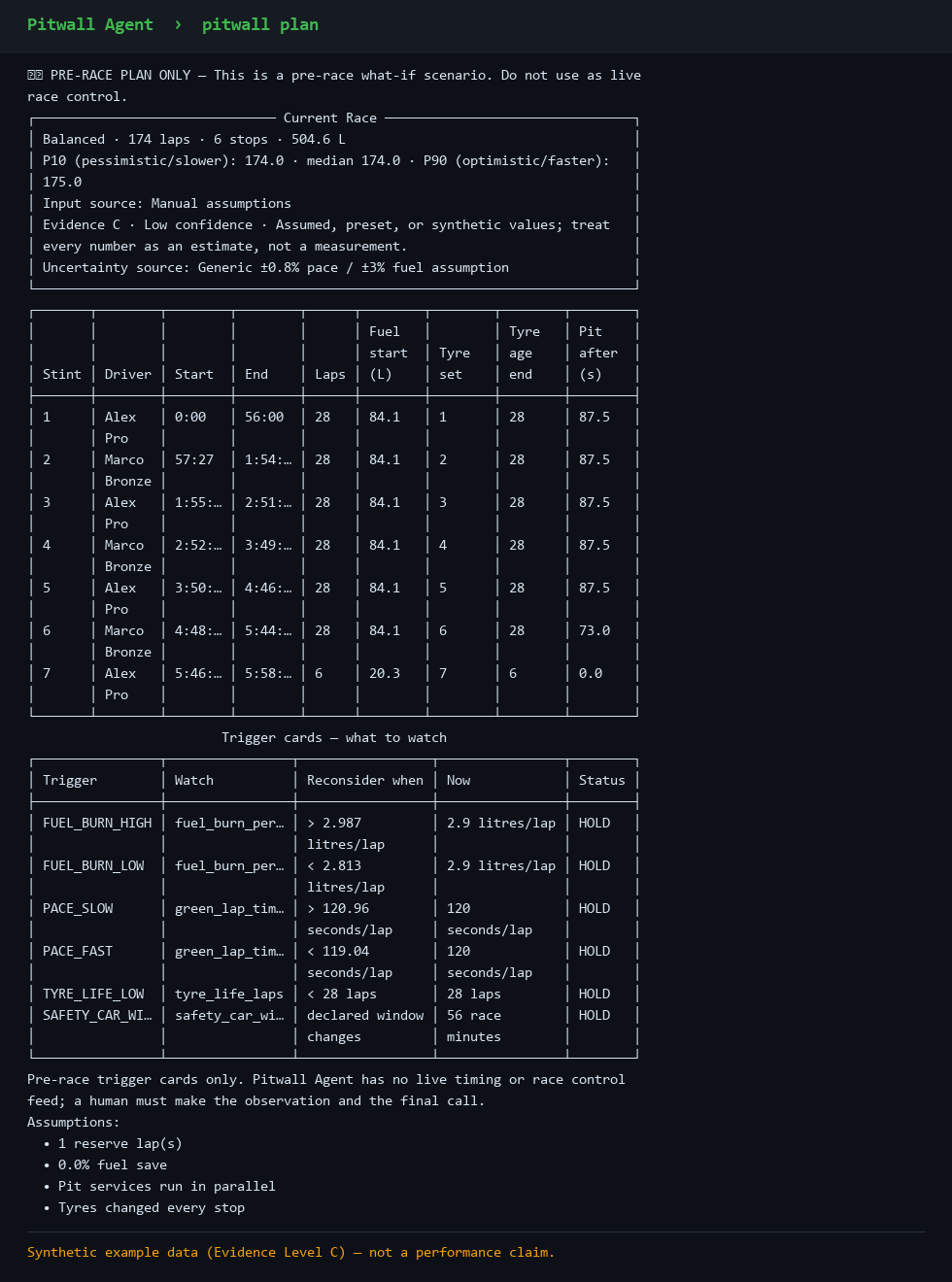
Stint lengths, fuel loads, and exact fuel additions per stop.
Tyre sets, age at stint end, and change planning per stop.
Stable driver identities and configured drive-time rule checks.
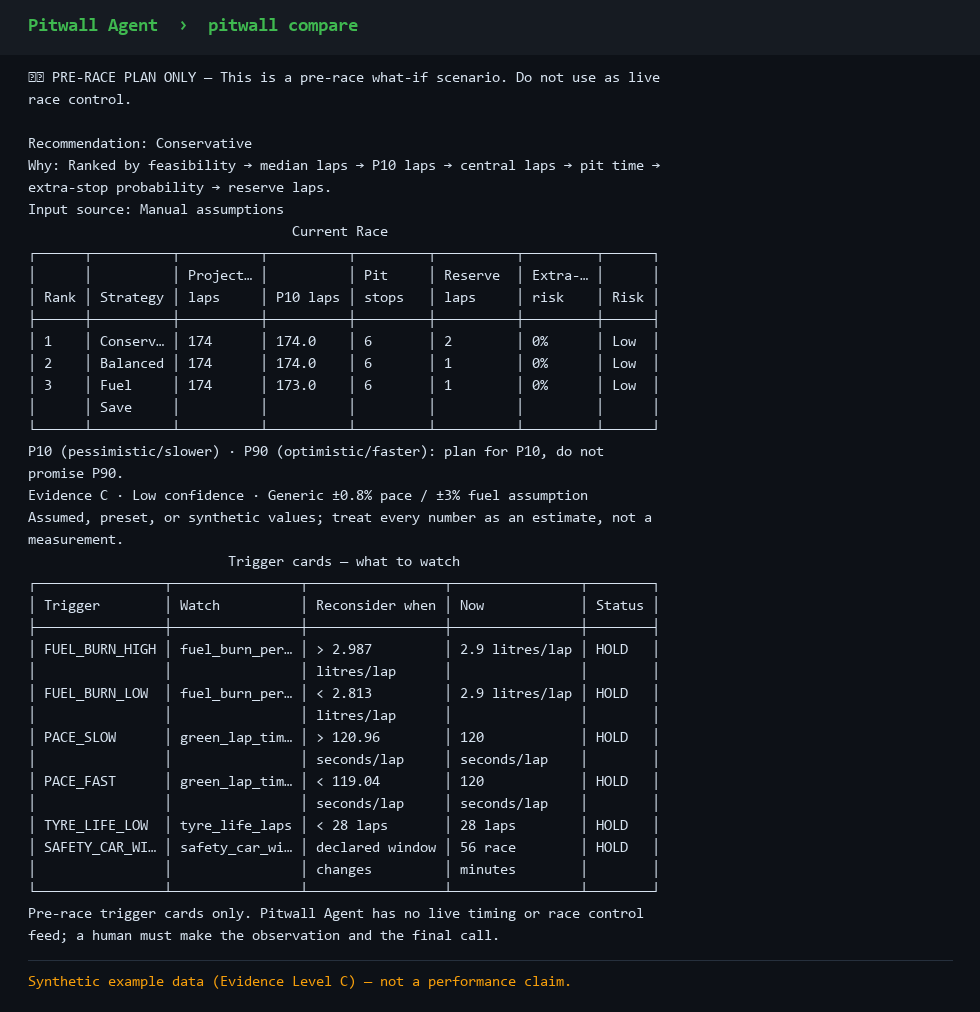
Conservative / Balanced / Fuel Save ranked side by side.
For projected laps, P10 is the fewer-laps case and P90 the more-laps case. Raw lap-time percentiles reverse because fewer seconds is faster.
Column mapping, outlier checks, and evidence calibration from your laps.
One declared pre-race scenario with explicit multipliers. Pre-race only.
Pre-agreed HOLD / RECONSIDER thresholds to take to the pit wall.
One scannable page to print or keep open on race day.
--json on the commands you script or pipe into your own tools.
Ollama on loopback only, for plain-language routing. Final race facts remain deterministic, and everything works without AI.
No live timing, no proprietary APIs, no accounts, no tracking.
Captured output from the published alpha.2 CLI running the bundled synthetic 6-hour example in core-only mode.
Open the full stint-by-stint plan screenshot — fuel, tyre, driver, pit-stop, and trigger-card output from the same deterministic run.
Excerpt of an exported Markdown pit sheet. Every figure is traceable to an input and an evidence level.
# Pit sheet: 6h Endurance — GT3
⚠️ PRE-RACE PLAN ONLY — Not live race control

Strategy: Conservative (recommended)
Evidence: C | Confidence: Low | Source: Manual assumptions
Predicted laps: 174 | Pit stops: 6 | Fuel used: 504.6 L
P10: 174.0 laps | Median: 174.0 | P90: 175.0 laps

TRIGGER CARDS
FUEL_BURN_HIGH  [HOLD]  Reconsider above 2.987 L/lap
PACE_SLOW       [HOLD]  Reconsider above 120.96 seconds/lap

STINT 1  Laps 1–28  | Alex Pro     | Fuel start 87.0 L | Tyre set 1
STINT 2 Laps 29–56 | Marco Bronze | Fuel add 81.2 L | Pit 87.5 sGitHub-only alpha. Pitwall Agent is not published on PyPI. Download the versioned alpha.2 source ZIP or wheel from GitHub Releases. The core install never downloads Ollama or an AI model.
# 1. Install Python 3.11–3.14 from python.org
# 2. Download the source ZIP linked below
# 3. Choose Extract all
# 4. Double-click run.bat
Download the alpha.2 source ZIP. The launcher creates a private environment, runs a health check, and opens Pitwall.
git clone https://github.com/Dabi-init/endurance-stint-planner.git
cd endurance-stint-planner
python3 -m venv .venv
. .venv/bin/activate
python -m pip install -e .
pitwall doctor
pitwall init --guided
pitwall compareThe published alpha.2 wheel is approximately 92 KB and is attached to the versioned GitHub release. SHA-256 checksums are published beside the wheel and source archive.
In a clean Windows/Python 3.14 audit, Pitwall's installed files used about 738 KB, the complete private virtual environment used about 27.4 MB, and an extracted source copy plus its launcher-created environment used about 28.1 MB. The launcher's isolated two-run test retained 0 bytes in its pip-cache directory. A Git clone also retains Git history; totals vary by Python and operating system. App imports are capped at 10 MiB and 50,000 rows per CSV, with 100 MiB total telemetry storage. Reports and validations are capped at 2 MiB each, 25 MiB combined, and 500 files.
git clone https://github.com/Dabi-init/endurance-stint-planner
cd endurance-stint-planner
# Windows PowerShell
py -3.14 -m venv .venv
.\.venv\Scripts\python.exe -m pip install -e ".[dev]"

# macOS / Linux (use instead)
python3 -m venv .venv
.venv/bin/python -m pip install -e ".[dev]"Source ZIP → run.batautomatic checks/compare/plan Conservative/export demo/setupThe first comparison uses the bundled Evidence C demo. Run /setup before relying on your own race inputs. No API key, cloud account, or data upload.
Choose your model storage. Every deterministic feature works with no AI. Core-only uses 0 GB of model storage; no Ollama install or model opt-in is required.
.\.venv\Scripts\python.exe -m pitwall model off.qwen3:8b, approximately 5.2 GB of model storage.qwen3:4b, approximately 2.5 GB of model storage.# Provisional first model to try
ollama pull qwen3:8b
.\.venv\Scripts\python.exe -m pitwall model use qwen3:8b
# Smaller unverified candidate
ollama pull qwen3:4b
.\.venv\Scripts\python.exe -m pitwall model use qwen3:4bpitwall model recommend runs a read-only deterministic core self-check and prints these Ollama-only choices. It never contacts Ollama, downloads a model, creates a workspace, or changes configuration. Core-only is the verified operational path; both model candidates remain unverified until Pitwall publishes a real-model tool-calling conformance benchmark.
Pitwall never downloads a model automatically. Model sizes exclude Ollama and its caches. Ollama's Windows installation requires at least 4 GB, so the 8B setup needs roughly 9.2 GB or more. Remove an opted-in model with .\.venv\Scripts\python.exe -m pitwall model off followed by ollama rm qwen3:8b or ollama rm qwen3:4b; uninstall Ollama separately if you no longer need it.
Read this before you rely on it for a real event.
This project gets better the moment real racers tell us what broke.